ZX Spectrum guide
ZX Spectrum File Formats: TAP, TZX, Z80 and More Explained
Spectrum games turn up as TAP, TZX, Z80 and a dozen other file types. Here is what each one holds, why they differ, and which to use.
In short
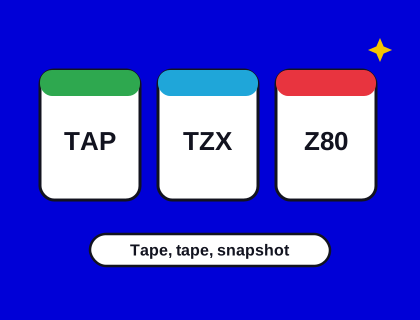
- Tape images (TAP, TZX, PZX, CSW) are copies of a cassette. They load like a real tape.
- TAP is simple and works for games that use the standard Sinclair loader.
- TZX can preserve custom and protected loaders, so it's the format for faithful archive copies.
- Snapshots (Z80, SNA, SZX) are a frozen copy of the whole machine. They start instantly.
- Disk images (DSK for the +3, TRD and SCL for Beta Disk) need a disk-capable emulator.
Why are there so many Spectrum file formats?
The Spectrum loaded its software from cassette tape, as a sound recording. When people began running Spectrum games on PCs in the late 1980s and 1990s, each emulator needed a way to store those tapes as files, and several authors invented their own. Others invented ways to save the whole state of the machine at once. Over time the community settled on a handful of formats, and good emulators now read nearly all of them.
There are three broad families: tape images, which copy the cassette; snapshots, which copy the computer's memory; and disk images, which copy a floppy disk.
Tape images: TAP, TZX, PZX and CSW
TAP
A TAP file is the simplest tape format. It stores each block of data that the Spectrum's ROM would save or load, one after another, with a length in front of each. It doesn't store the sound itself, only the bytes, so it can only describe tapes that used the standard Sinclair loading routine. For most homebrew games, including ours, TAP is all you need: it's small, easy to make and works almost everywhere.
TZX
Many commercial games in the 1980s used their own loaders, for faster loading, fancy loading screens or copy protection. A TAP file can't describe those, but a TZX file can. It records the exact timing of the pulses on the tape, block by block, along with information such as the publisher and the inlay text. TZX became the standard format for preserving original cassettes, and it's what you'll usually find in archives.
PZX and CSW
PZX is a newer format that stores a tape as a list of pulses, and it's simpler to support than TZX. CSW (compressed square wave) is closer to a raw recording of the tape's signal, useful when a loader is too unusual for anything else. Speccy reads both.
Snapshots: Z80, SNA and SZX
A snapshot is a copy of everything inside the Spectrum at one moment: all of its memory, the processor's registers, the border colour and, for the 128K, the sound chip and memory paging. Loading one puts the machine back exactly where it was, so the game simply carries on. There's no loading time and no tape.
- Z80 is the most common snapshot format. It was created for one of the earliest PC Spectrum emulators and later extended for the 128K. It can be compressed.
- SNA is an older, simpler format. A 48K SNA file is always the same size: the memory plus a few bytes of registers.
- SZX is a more complete modern format, which can also store the state of extra hardware.
Snapshots are convenient, but they're not ideal for preservation: they skip the loading screen, and a snapshot taken mid-game may already have lost a life or changed a setting. Speccy's save slots are snapshots too, and its download button saves one as a Z80 file you can use in other emulators.
Other Spectrum files
| Extension | What it is |
|---|---|
| .scr | A screen: the 6,912 bytes of a Spectrum display, often a loading screen |
| .rom | A ROM image, such as the 16 KB 48K ROM or the 32 KB 128K ROM |
| .dsk | A disk image for the Spectrum +3's 3-inch drive |
| .trd, .scl | Disk images for the Beta Disk interface, popular on Russian and Eastern European Spectrums |
| .mdr | A Microdrive cartridge image (Sinclair's tape-loop drive) |
| .rzx | A recording of someone playing a game, which an emulator can play back |
| .pok | A list of POKEs: cheats such as infinite lives |
TAP vs TZX: which should I use?
If you have both, use the TZX for a classic commercial game: it's the faithful copy, and it will load even if the game used a custom loader. Use a TAP for homebrew games and anything that loads with the standard routine; it's smaller and every emulator and modern machine handles it. If you just want to play without waiting, use a snapshot.
One thing to know if you own The Spectrum from Retro Games Ltd: it loads TAP and TZX files from a USB stick, but reviewers found TZX support patchy, so a TAP is the safer choice when one exists.
Opening these files
Speccy opens all the tape and snapshot formats above, inside ZIP or GZ archives too. See how to load your own tape files, or our list of the best desktop emulators if you need disk support.
Questions and answers
What is the difference between TAP and TZX?
A TAP file stores only the data blocks of a tape that uses the standard Sinclair loader. A TZX file also records exact timings, so it can preserve custom and copy-protected loaders. See Spectrum file formats explained.
What is a Z80 file?
A Z80 file is a snapshot: a copy of the Spectrum's whole memory and processor state at one moment. Loading it restores the game instantly, with no tape loading. Speccy's download button saves Z80 files.